Sunday, September 27, 2020

Dependency Injection ( IoC: Inversion of control)


IoC Container

IoC Container (a.k.a. DI Container) is a framework for implementing automatic dependency injection. It manages object creation and it's life-time, and also injects dependencies to the class.

The IoC container creates an object of the specified class and also injects all the dependency objects through a constructor, a property or a method at run time and disposes it at the appropriate time. This is done so that we don't have to create and manage objects manually.

All the containers must provide easy support for the following DI lifecycle.

  • Register: The container must know which dependency to instantiate when it encounters a particular type. This process is called registration. Basically, it must include some way to register type-mapping.
  • Resolve: When using the IoC container, we don't need to create objects manually. The container does it for us. This is called resolution. The container must include some methods to resolve the specified type; the container creates an object of the specified type, injects the required dependencies if any and returns the object.
  • Dispose: The container must manage the lifetime of the dependent objects. Most IoC containers include different lifetimemanagers to manage an object's lifecycle and dispose it.

There are many open source or commercial containers available for .NET. Some are listed below.

  • Unity Container :
  • ===========

I have seen many articles about Dependency Injection in MVC and C# and thought to write an article about using it in ASP.NET MVC5.

Below is short brief of Dependency Injection (DI)

This pattern is an implementation of "Inversion of Control". Inversion of Control (IoC) says that the objects do not create other objects on which they rely to do their work; instead, they get the objects that they need from an outside source (for example, an XML configuration file).

So now, let’s implement the same.

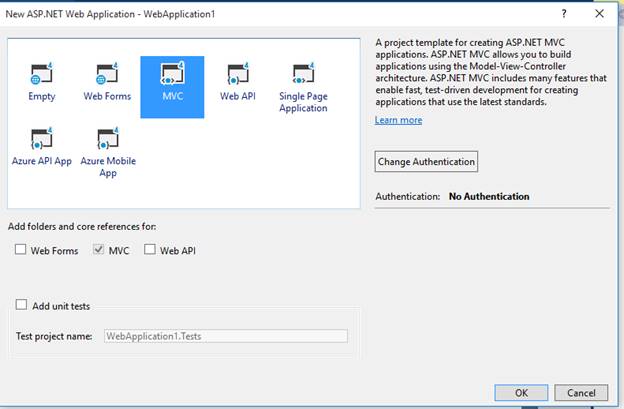
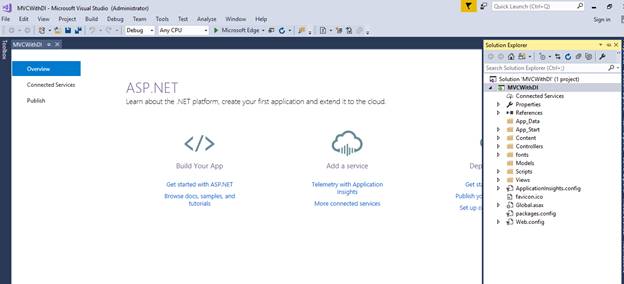
  • Add a new ASP.NET MVC project.

    Dependency Injection In ASP.NET

    Dependency Injection In ASP.NET

    Dependency Injection In ASP.NET
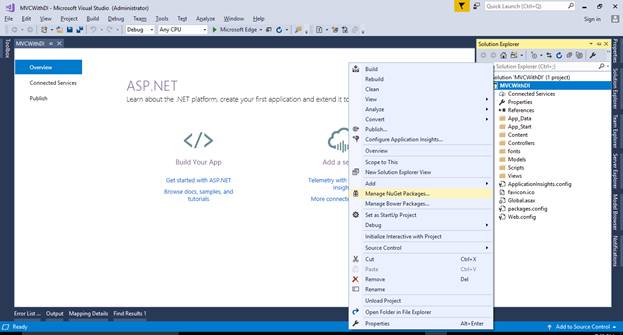
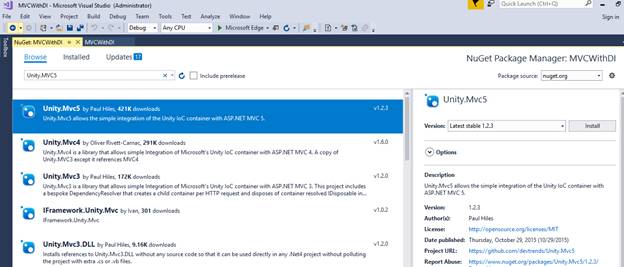
  • Now, install the "Unity.Mvc5" Container using NuGet Package Manager, as shown below.
    Dependency Injection In ASP.NET

    Dependency Injection In ASP.NET

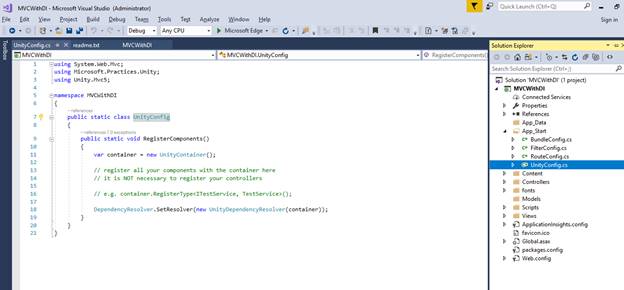
    When it is installed successfully, you will find the following two references added to your project and a UnityConfig.cs class file in App-Start folder.
    Dependency Injection In ASP.NET
  • Now, let’s create the repository that will be accessed by Controller.

    • Add a folder named Repository.
    • Add an interface IUserMasterRepository.
      1. interface IUserMasterRepository  
      2.     {  
      3.         IEnumerable<UserMaster> GetAll();  
      4.         UserMaster Get(int id);  
      5.         UserMaster Add(UserMaster item);  
      6.         bool Update(UserMaster item);  
      7.         bool Delete(int id);  
      8.     }  
  • Now, add the repository which has your data access code.
    1. public class UserMasterRepository : IUserMasterRepository  
    2.     {  
    3.         private List<UserMaster> users = new List<UserMaster>();  
    4.         private int Id = 1;  
    5.   
    6.         public UserMasterRepository()  
    7.         {  
    8.             // Add products for the Demonstration  
    9.             Add(new UserMaster { Name = "User1", EmailID = "user1@test.com", MobileNo="1234567890" });  
    10.             Add(new UserMaster { Name = "User2", EmailID = "user2@test.com", MobileNo = "1234567890" });  
    11.             Add(new UserMaster { Name = "User3", EmailID = "user3@test.com", MobileNo = "1234567890" });  
    12.         }  
    13.   
    14.         public UserMaster Add(UserMaster item)  
    15.         {  
    16.             if (item == null)  
    17.             {  
    18.                 throw new ArgumentNullException("item");  
    19.             }  
    20.   
    21.             item.ID = Id++;  
    22.             users.Add(item);  
    23.             return item;  
    24.         }  
    25.   
    26.         public bool Delete(int id)  
    27.         {  
    28.             users.RemoveAll(p => p.ID  == id);  
    29.             return true;  
    30.         }  
    31.   
    32.         public UserMaster Get(int id)  
    33.         {  
    34.             return  users.FirstOrDefault(x => x.ID == id);  
    35.         }  
    36.   
    37.         public IEnumerable<UserMaster> GetAll()  
    38.         {  
    39.             return users;  
    40.         }  
    41.   
    42.         public bool Update(UserMaster item)  
    43.         {  
    44.             if (item == null)  
    45.             {  
    46.                 throw new ArgumentNullException("item");  
    47.             }  
    48.   
    49.               
    50.             int index = users.FindIndex(p => p.ID == item.ID);  
    51.             if (index == -1)  
    52.             {  
    53.                 return false;  
    54.             }  
    55.             users.RemoveAt(index);  
    56.             users.Add(item);  
    57.             return true;  
    58.         }  
    59.     }  

Note

Here, we have used a repository. You can use services which will consume your Repository.

  • Now, register this repository to container in UnityConfig.cs.
    1. public static void RegisterComponents()  
    2.         {  
    3.             var container = new UnityContainer();  
    4.   
    5.              
    6.             container.RegisterType<IUserMasterRepository, UserMasterRepository>();  
    7.             DependencyResolver.SetResolver(new UnityDependencyResolver(container));  
    8.         }  
  • Add UnityConfiguration in AppStart method of Global.asax
    1. protected void Application_Start()  
    2.         {  
    3.             AreaRegistration.RegisterAllAreas();  
    4.             FilterConfig.RegisterGlobalFilters(GlobalFilters.Filters);  
    5.             RouteConfig.RegisterRoutes(RouteTable.Routes);  
    6.             BundleConfig.RegisterBundles(BundleTable.Bundles);  
    7.   
    8.               
    9.             UnityConfig.RegisterComponents();  
    10.         }  
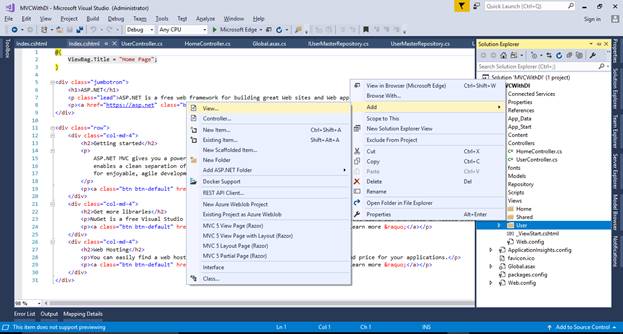
  •  Inject the Dependency in Controller.

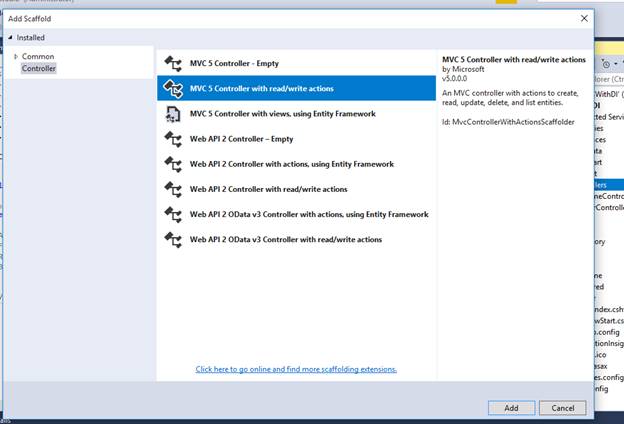
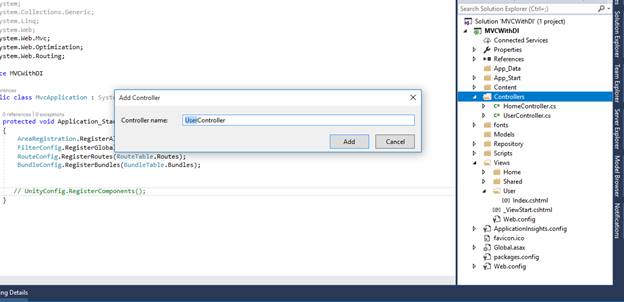
    • Create UserController

      Dependency Injection In ASP.NET

      Dependency Injection In ASP.NET

    • Now, in the below code, we have created a constructor of UserContoller, injected the UserMasterRepository, and accessed it in Index action.
      1. public class UserController : Controller  
      2.     {  
      3.         readonly IUserMasterRepository userRepository;  
      4.         public UserController(IUserMasterRepository repository)  
      5.         {  
      6.             this.userRepository = repository;  
      7.         }  
      8.         // GET: User  
      9.         public ActionResult Index()  
      10.         {  
      11.             var data = userRepository.GetAll();  
      12.                 return View(data);  
      13.         }  
      14. }  
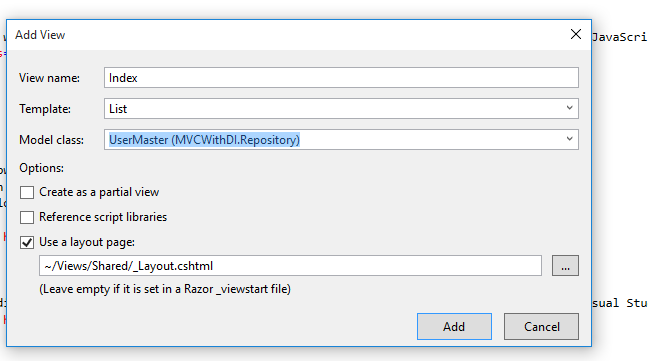
  • Add a View for the same.

    • Add User folder in Views folder.
    • Add Index View.

      Dependency Injection In ASP.NET

      Dependency Injection In ASP.NET

Below is the code which needs to be written in Index View file.

  1. @model IEnumerable<MVCWithDI.Repository.UserMaster>  
  2.   
  3. @{  
  4.     ViewBag.Title = "Users";  
  5.     Layout = "~/Views/Shared/_Layout.cshtml";  
  6. }  
  7.   
  8. <h2>Index</h2>  
  9.   
  10. <p>  
  11.     @Html.ActionLink("Create New""Create")  
  12. </p>  
  13. <table class="table">  
  14.     <tr>  
  15.         <th>  
  16.             @Html.DisplayNameFor(model => model.Name)  
  17.         </th>  
  18.         <th>  
  19.             @Html.DisplayNameFor(model => model.EmailID)  
  20.         </th>  
  21.         <th>  
  22.             @Html.DisplayNameFor(model => model.MobileNo)  
  23.         </th>  
  24.         <th></th>  
  25.     </tr>  
  26.   
  27. @foreach (var item in Model) {  
  28.     <tr>  
  29.         <td>  
  30.             @Html.DisplayFor(modelItem => item.Name)  
  31.         </td>  
  32.         <td>  
  33.             @Html.DisplayFor(modelItem => item.EmailID)  
  34.         </td>  
  35.         <td>  
  36.             @Html.DisplayFor(modelItem => item.MobileNo)  
  37.         </td>  
  38.         <td>  
  39.             @Html.ActionLink("Edit""Edit"new { id=item.ID }) |  
  40.             @Html.ActionLink("Details""Details"new { id=item.ID }) |  
  41.             @Html.ActionLink("Delete""Delete"new { id=item.ID })  
  42.         </td>  
  43.     </tr>  
  44. }  
  45.   
  46. </table>  

Now, run the project. Here is the output.

Dependency Injection In ASP.NET

Sunday, September 6, 2020

OOPs Interview Questions !!!

 1) Difference between Abstract class and Interface ?

2) How can we call abstract class ?

3) Is it possible to declare a class as private ? If yes what happens ?

4) can we declare static constructor in abstract class ? If yes when it will be fired ?

5) Difference between Static class and Singleton design pattern class ?

6) Singleton design pattern steps ?

7) Why it is not possible to create an object for a abstract class ?

8) A:B

  B:C

if we create object like this

Class A obj=new Class C():

what heppens in different scenarios ?

1) Override method Implementations 

2) Method Implementation using New keyword.

9) what are the different types of constructors and order of the execution in single class and inherited class and multilevel inheritance ?

10) If a class inherited from two different interfaces(multiple inheritance) and those have same method name then how do it will be implemented ?

11) What is Abstraction with example and Encapsulation ?

13)  Difference between IEnumerable & IQuarable ?

14) Differencce between IEnumarable & IEnumerator ?

15) Threadings, Delegates & Parallel program with exaples ?

16) What is the use of Interfaces ?

17) SOLID Principles with example ?

18) Design patterns like Factory, Singleton, Abstract etc..

19) Entity Framework Interview Questions

20) .NET Core life cycle ( Middleware examples, custom middlewares )

21) Azure :

Functions, LogicApps, ServiceBus, WebLogic, App Service gatway, API Management Gateway, Storages etc...


Keep update the entities if the db modified in entity framework

 public class MyContext : DbContext 

{

    public MyContext() {

        Database.SetInitializer(new DropCreateDatabaseIfModelChanges<MyContext>());
    }
}

If we declare in global.asax then automatically will done.
 Database.SetInitializer(new DropCreateDatabaseIfModelChanges<MyContext>());

AntiForgery in MVC

Prevent Cross-Site Request Forgery (XSRF/CSRF) attacks in ASP.NET Core


AntiForgeryConfig.UniqueClaimTypeIdentifier = ClaimsIdentity.DefaultNameClaimType;


[HttpPost, ActionName("Edit")] [ValidateAntiForgeryToken] public ActionResult EditPost(int? id) {

}

Friday, May 15, 2020

What is Interface?

What is Interface?
  1. An interface can contain signatures (declarations) of the Methods, Properties, Indexers and Events.
  2. The implementation of the methods is done in the class that implements the interface.
  3. A Delegate is a type that can't be declared in an interface. You can either use an event (if appropriate) or declare a delegate outside the interface but in the same namespace.
  4. Interfaces in C# provides a way to achieve runtime polymorphism. Using interfaces, we can invoke functions from various classes through the same Interface reference, whereas using virtual functions we can invoke functions from various classes in the same inheritance hierarchy through the same reference.
  5. An interface can inherit from one or more base interfaces.
  6. A class that implements an interface can explicitly implement members of that interface.
  7. An explicitly implemented member cannot be accessed through a class instance, but only through an instance of the interface.
Purposes of Interfaces
  1. Create loosely coupled software.
  2. Support design by contract (an implementer must provide the entire interface).
  3. Allow for pluggable software.
  4. Allow objects to interact easily.
  5. Hide implementation details of classes from each other.
  6. Facilitate reuse of software.

What is the difference between a Local and a Global temporary table?

What is the difference between a Local and a Global temporary table?

Temporary tables are used to allow short term use of data in SQL Server. They are of 2 types:

Local
- Only available to the current Db connection for current user and are cleared when connection is closed.
- Multiple users can’t share a local temporary table.

Global
- Available to any connection once created. They are cleared when the last connection is closed.
- Can be shared by multiple user sessions.

What is the difference between a Local and a Global temporary table?

A local temporary table lives until the connection is valid or until the duration of a compound statement.

A global temporary table is permanently present in the database. However, the rows of the table are present until the connection is existent. Once the connection is closed, the data in the global temporary table disappears. However, the table definition remains with the database for access when database is opened next time.